

Quick Verdict
Grammarly AI Agents are a solid upgrade that transforms my favorite grammar checker into a full-fledged, AI-powered writing assistant — helping you write more confidently.
They improve your writing inside apps you already use, be it for emails, blog posts, academic papers, and client communication. This deep integration makes Grammarly AI Agents worth it, especially if your day-to-day workflow involves these tasks.
What Changed with Grammarly?
For over a decade of using Grammarly, one thing I have appreciated is its consistency.
While you write, Grammarly works hard in the background to help polish your grammar, clarity, tone, and spelling.
While Grammarly still excels in these tasks, the new AI Agents help it work proactively by providing contextual assistance. That means more refined suggestions based on what you’re writing, who it’s for, and what outcomes you’re aiming for.
And as always, AI Agents are baked into the core Grammarly platform, so you don’t have to switch between tools or pages to get things done:
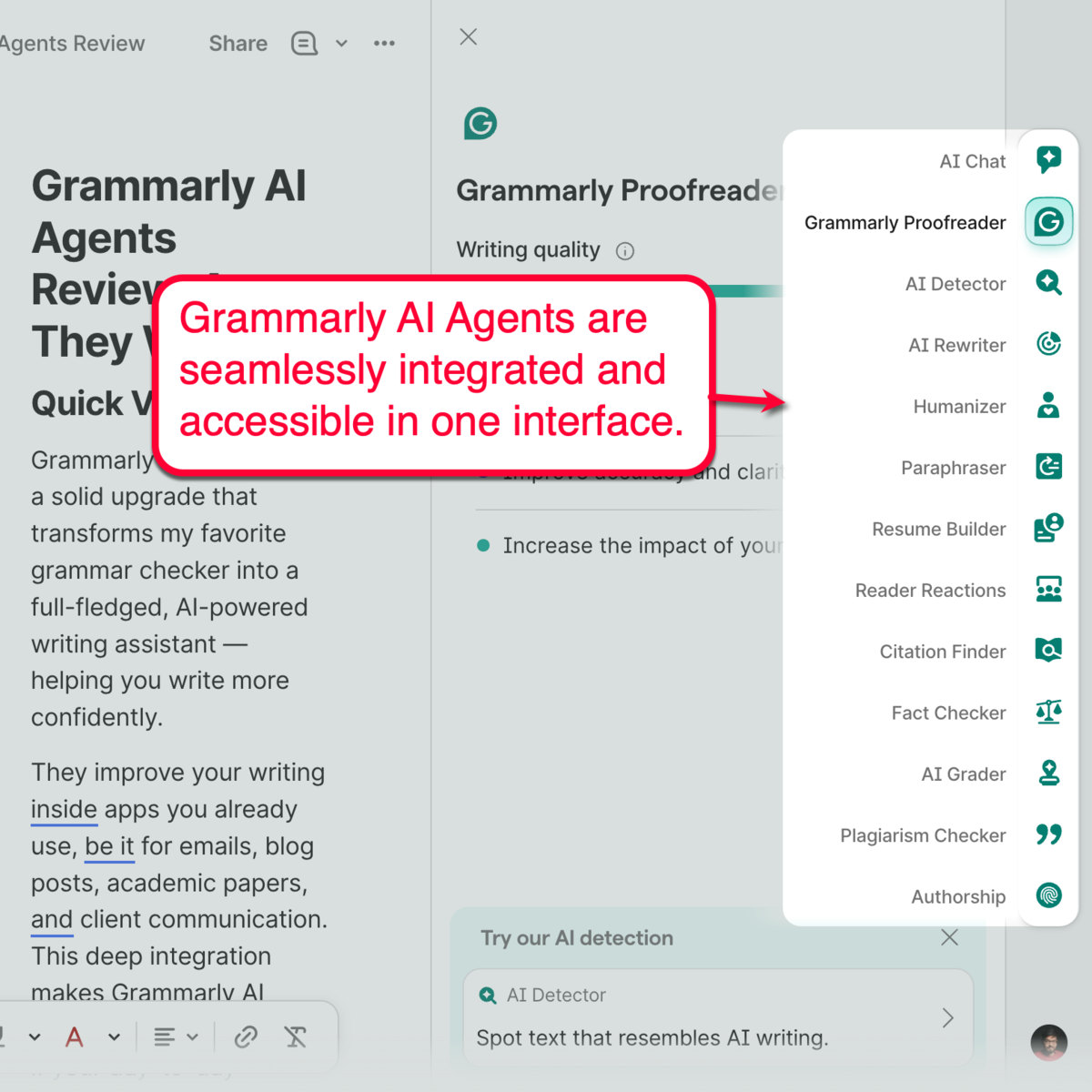
Here’s a quick list of these AI agents:
- AI Grader
- Citation Finder
- Reader Reactions
- Humanizer
- Proofreader
- Paraphraser
- AI Detector
- Plagiarism Checker
Get 40% off Grammarly — AI writing just got smarter.
Who Should Use Grammarly AI Agents?
The usefulness of Grammarly AI Agents depends less on how much you write and more on how important your writing is.
Grammarly AI Agents are worth it if you:
- Write emails, reports, or client/customer communications every day
- Create content for work, marketing, or business
- Submit academic papers and assignments regularly
- Use AI tools, but dislike constantly switching between tabs
- Want writing assistance directly inside the tools you already use
- Care about how your writing is received by readers
If your writing is crucial to your grades, revenue, opportunities, or professional relationships, Grammarly AI Agents are definitely worth it.
Grammarly AI Agents may not be worth it if you:
- Rarely write online
- Only need occasional grammar corrections
- Prefer using standalone generative AI tools or chatbots for all writing tasks
- Don’t mind copying content between multiple tools (fragmented software stack)
It’s worth noting that Grammarly isn’t aiming to replace SEO writing tools, like the Semrush Writing Assistant. But for people who spend most of their productive hours creating content, Grammarly AI Agents is a turnkey solution for streamlining your day-to-day workflows.
The AI Agents That Matter Most
You probably won’t need every Grammarly AI Agent.
In fact, you may only need to use two or three on a regular basis, and that’s fine.
The good news is, the entire AI Agents library comes bundled together with a Grammarly Pro subscription. You just need to know which ones will solve your content creation problems.
Here are the Grammarly AI Agents I think most people will get the most value from:
1. Reader Reactions
Everyone here has written something that sounded great in our heads — only to be misinterpreted on the other side.
Reader Reactions ensure your content lands just the way you want to before you hit “Send” or “Publish.” It predicts how your audience reacts to your writing, revealing potential misunderstandings, wrong takeaways, and follow-up questions based on your draft.
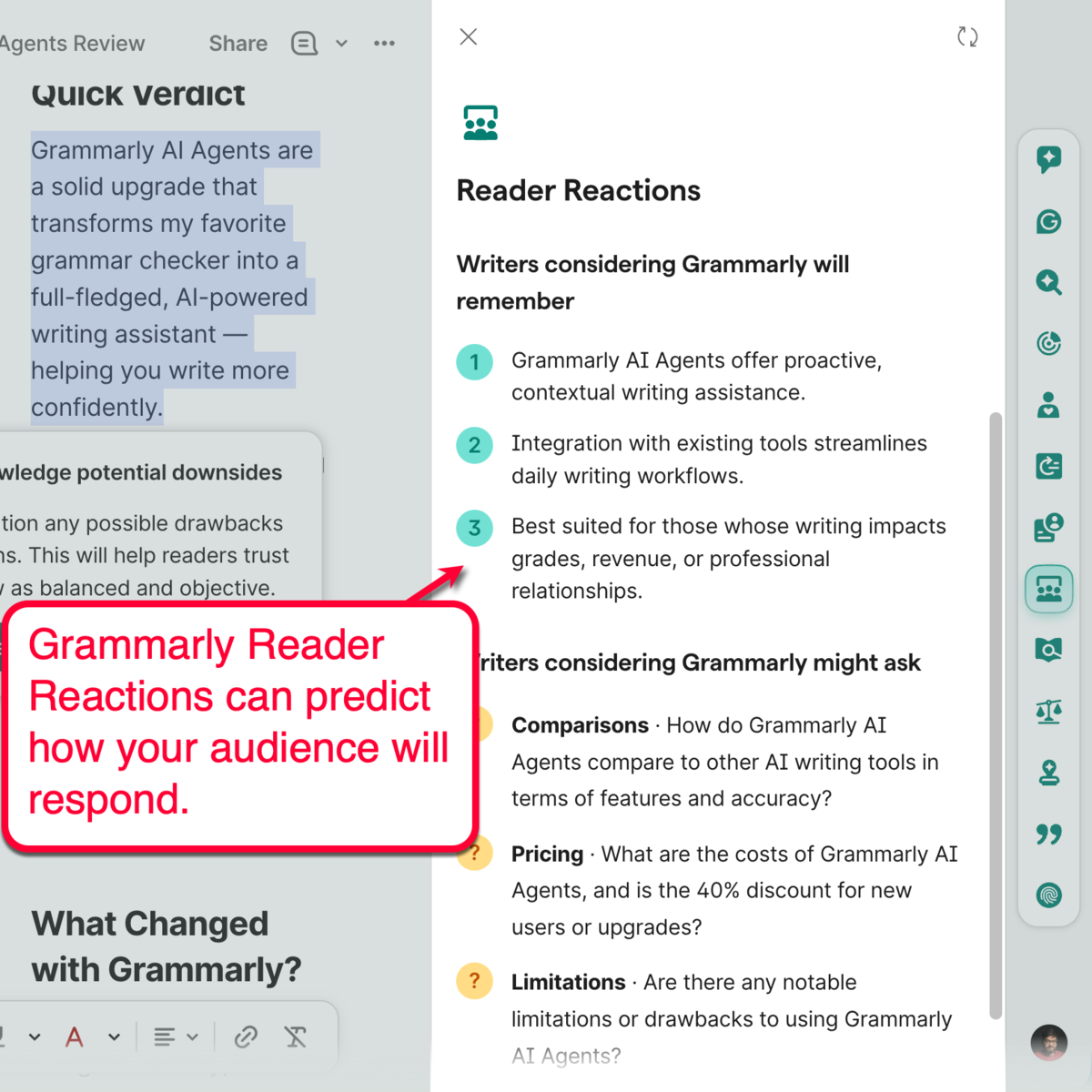
The advantages of Reader Reactions are obvious for businesses and marketers, especially if your current campaign focuses on building trust or generating conversions. For students, running the Reader Reactions tool at least once is a great way to foolproof your work before turning it in.
2. AI Grader
As a student, waiting for your paper to be graded can be just as stressful and anxiety-inducing as actually writing it.
Grammarly’s AI Grader can give you that much-needed peace of mind.
This tool works by predicting your paper’s final grade based on your instructor’s details as well as the assignment’s rubric or guidelines.
To use AI Grader, click ‘AI Grader’ from the sidebar and select ‘Add rubric and instructor’ if available. Otherwise, just click ‘Check with basic guidelines’ to use a standardized model for evaluation and grading.
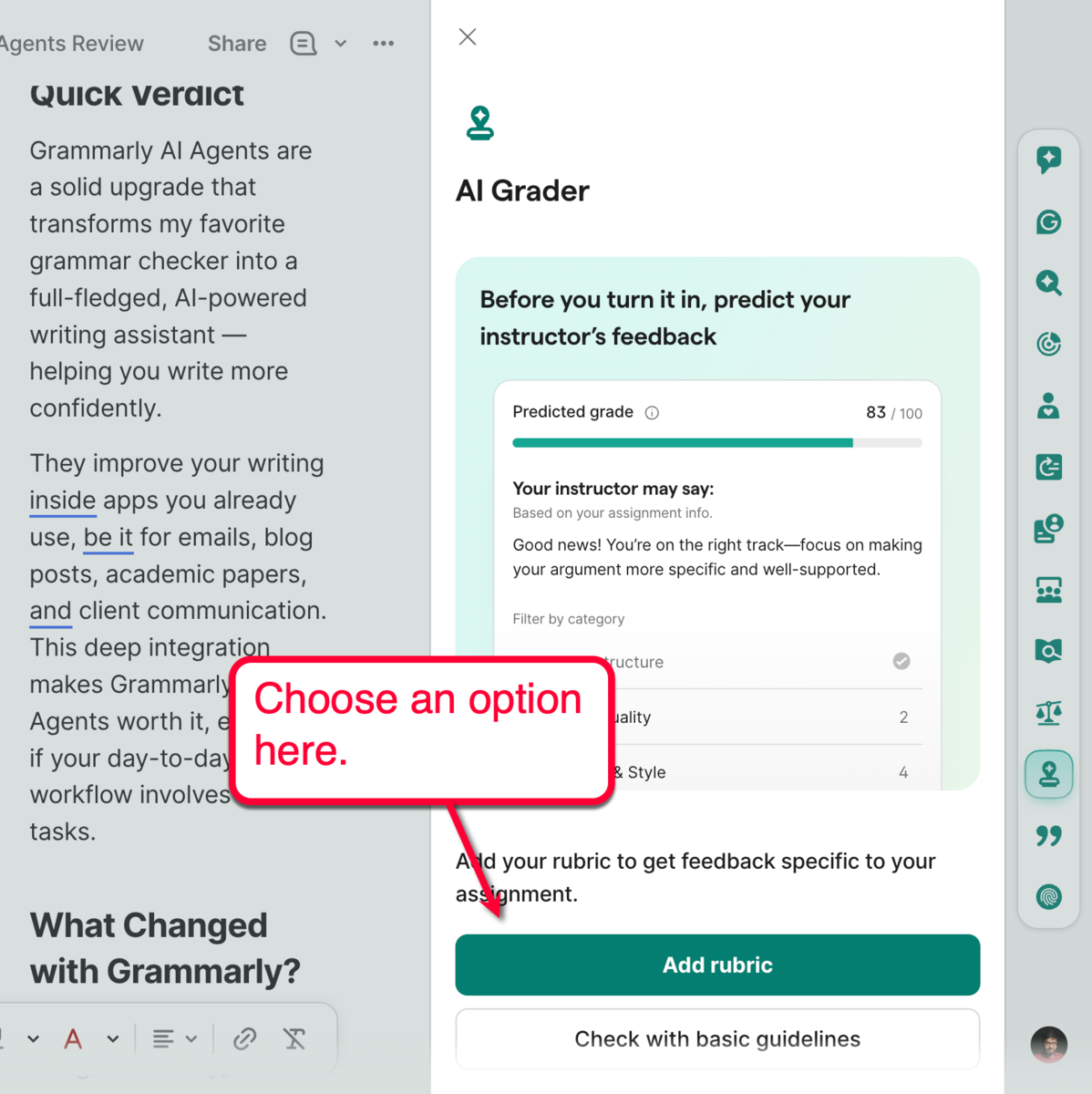
If you choose to upload a rubric and instructor, you need to enter your instructor’s details (e.g., name, school, and class) and upload your assignment guidelines.
After the analysis, you’ll be able to get an estimated grade for the current article. This includes a simulated feedback summary that will help you spot weaknesses and improvement opportunities.
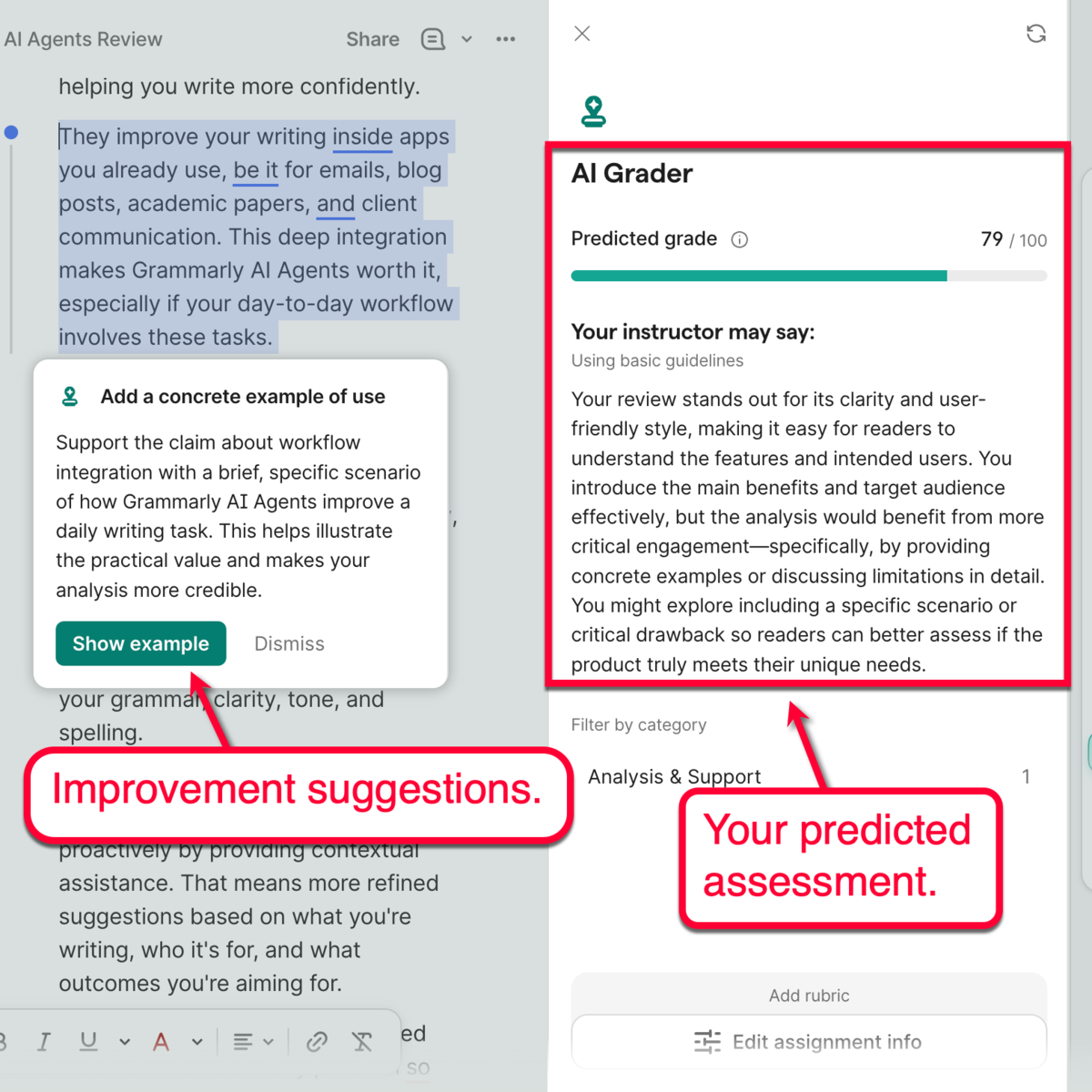
Keep in mind that AI Grader’s evaluation is just a prediction — not a one-to-one value that reflects your final grade. Still, it allows you to benchmark your write-up’s quality while preemptively analyzing useful feedback.
3. Citation Finder
Citations involving highly reputable data sources dramatically improve the trustworthiness and impact of academic papers.
The only problem for students is that adding citations can be a tedious and time-consuming task.
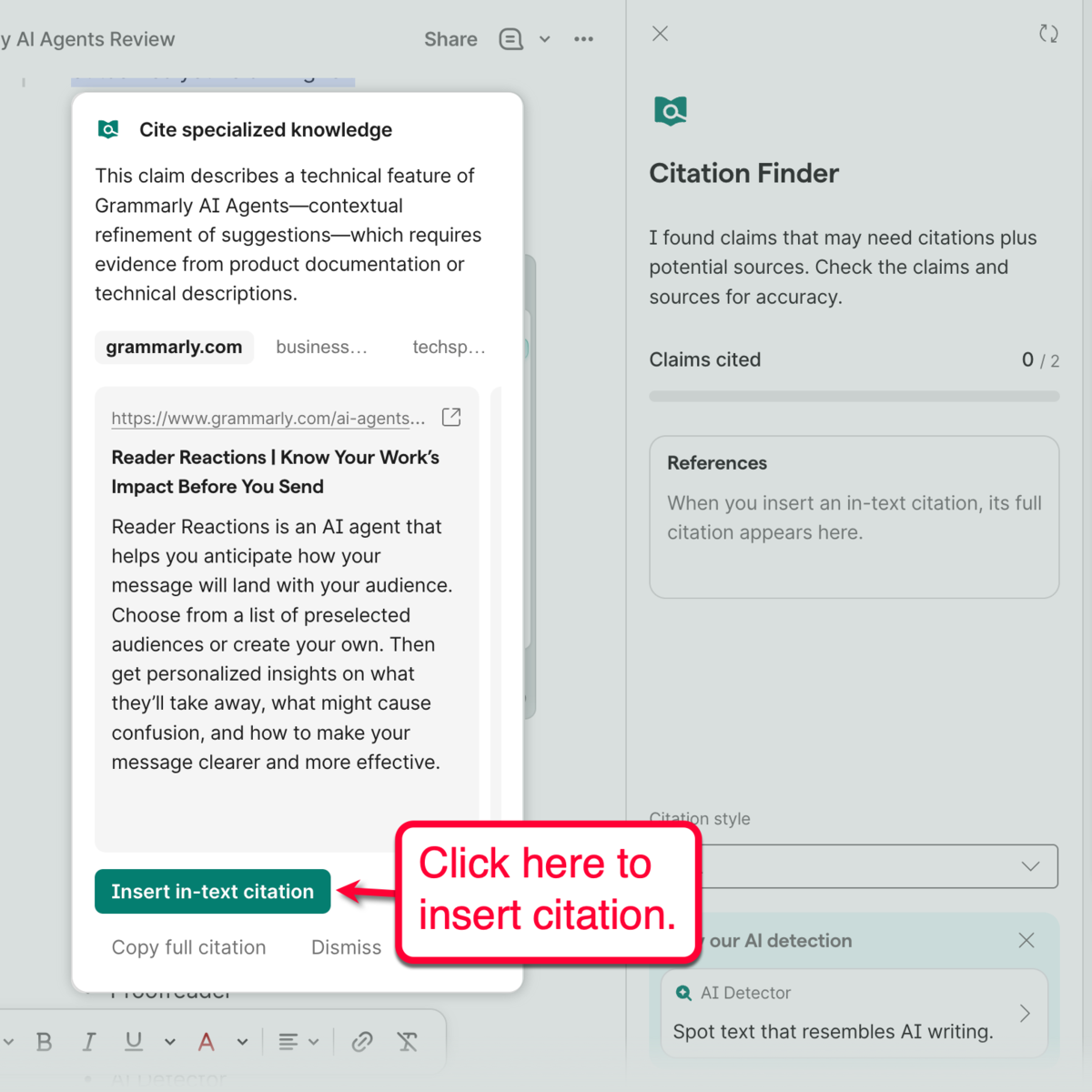
Citation Finder starts by scanning claims in your draft that could use reinforcement from a trustworthy data source.
The tool also takes the liberty of automatically finding good sources and generating ready-to-use citations. All you have to do is pick a citation style (APA, MLA, or Chicago) and click ‘Insert in-text citation’ to get the job done.
4. Humanizer
Let’s face it, most AI-generated content isn’t bad — but they tend to lack the natural, “human” feel.
Grammarly’s Humanizer tool addresses this.
Rather than changing your message, the tool helps inject a more natural sound and style while keeping your original intent and voice intact.
When editing your AI-generated draft, just click ‘Humanizer,’ choose a writing voice, and wait for the one-click suggestions to load.
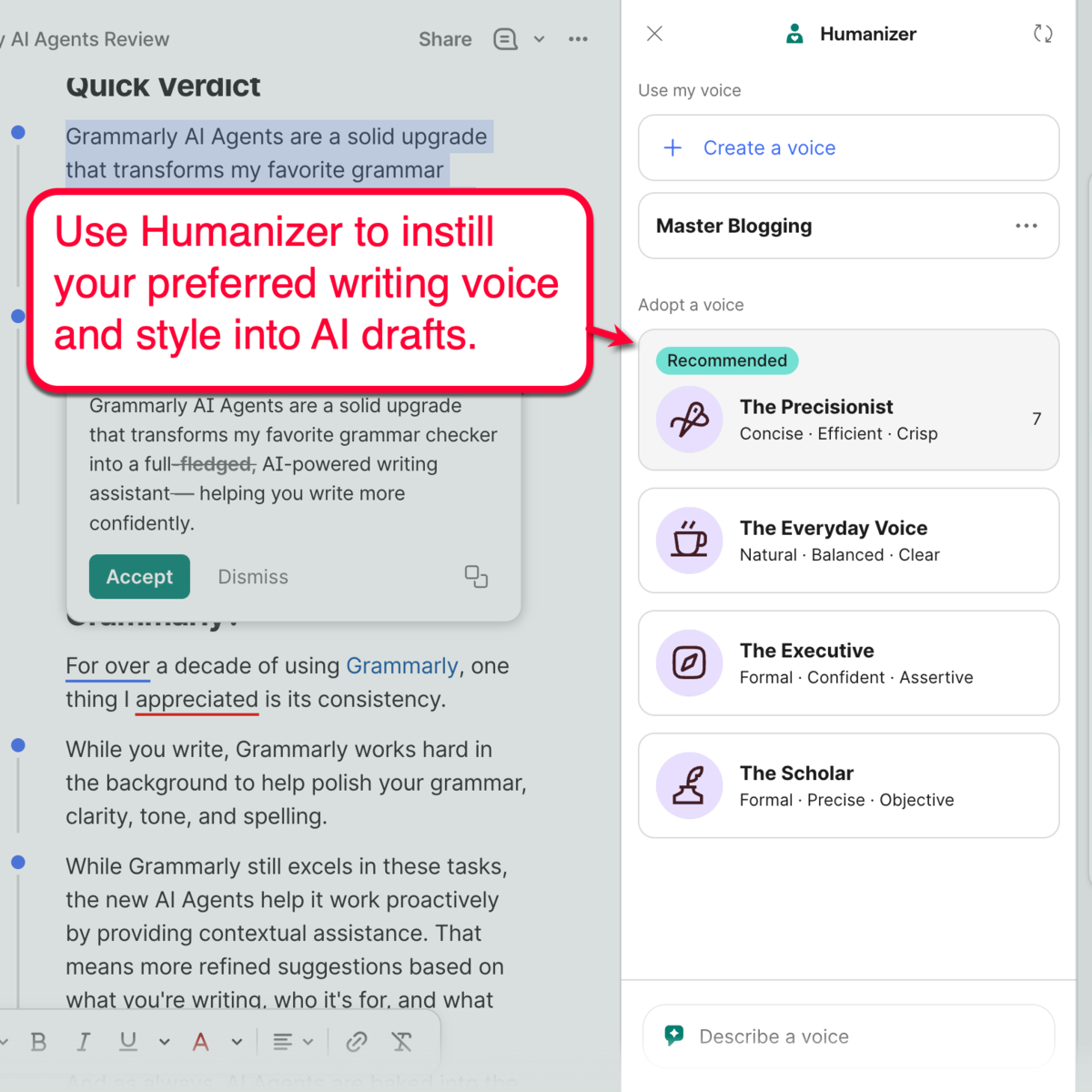
Humanizer also allows you to create your own brand’s writing voice. You just need a clear description and some writing samples — the AI Agent will figure out the rest on its own.
5. Proofreader & Paraphraser
The Grammarly Proofreader works right off the bat. It actually does the heavy lifting whenever you use the Grammarly browser extension, catching grammar mistakes, spelling errors, and clarity or tone issues.
Meanwhile, the Paraphraser is an essential AI Agent that helps refine awkward sentences, enhance readability, and improve flow. This will supercharge your article’s reader engagement factor within just a few clicks.
Get started by clicking ‘Paraphraser’ from the side menu.
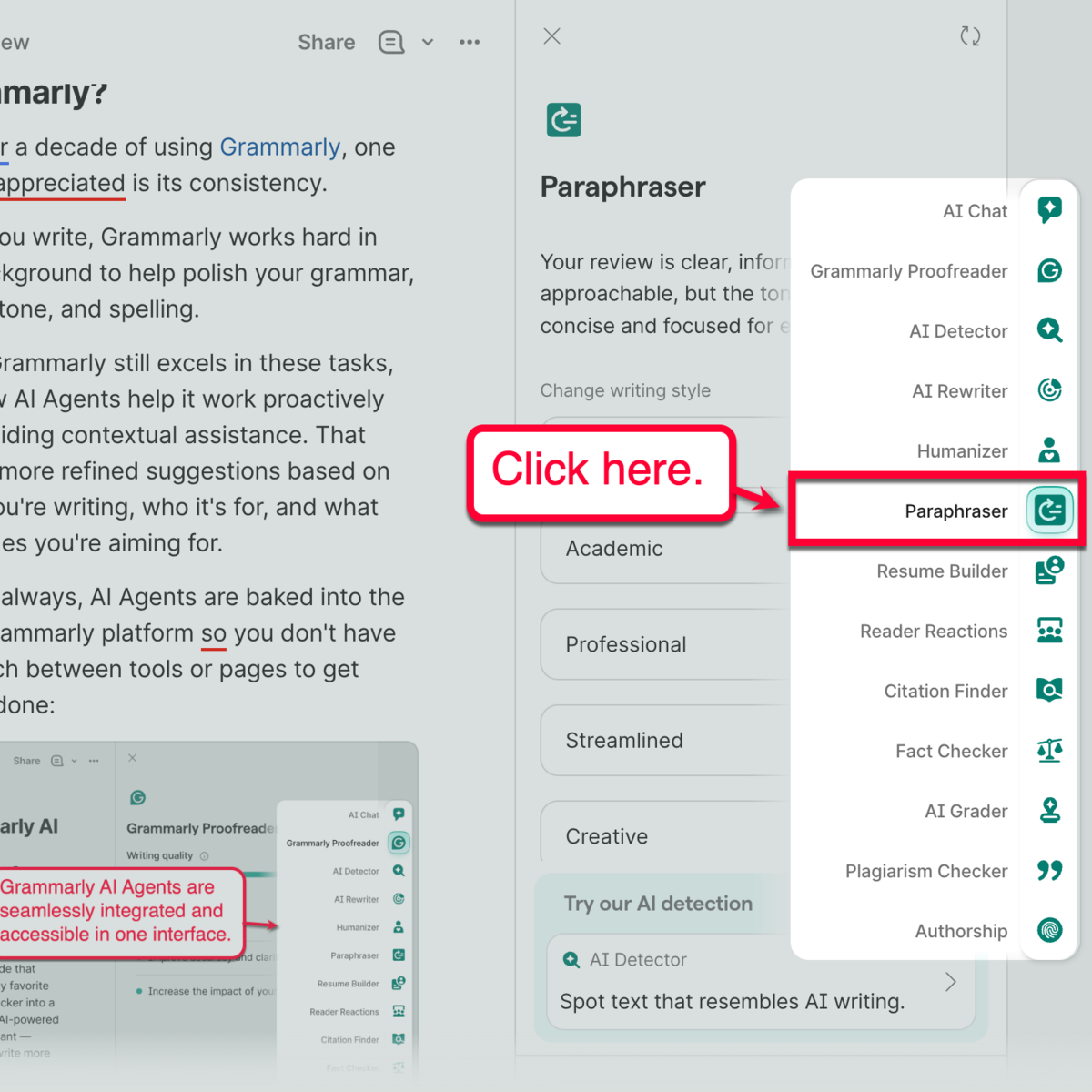
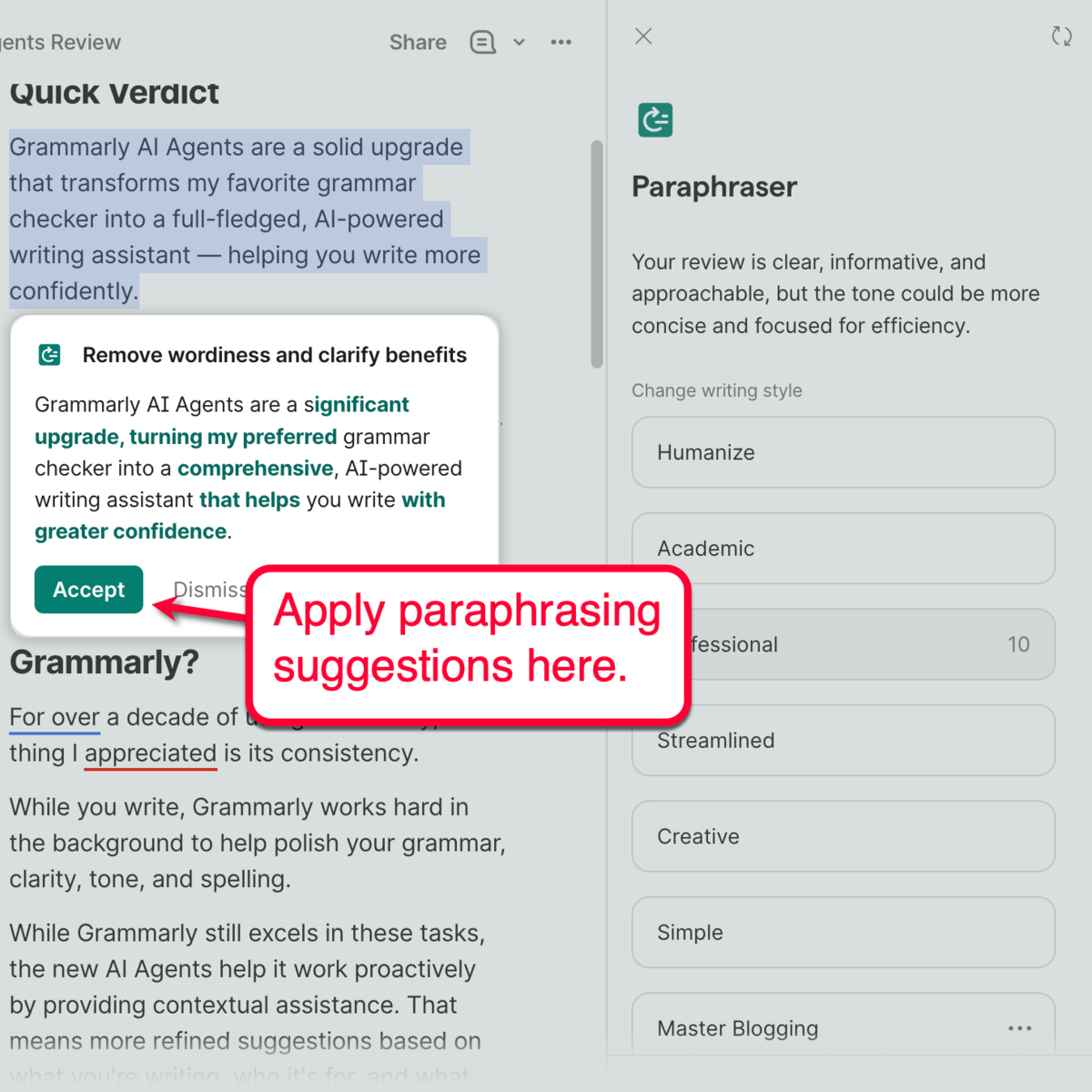
After the initial analysis, you can quickly revise your text using a different writing style, be it academic, professional, creative, simple, and so on.
You may also describe a different writing style in the “Describe a style” prompt field. Or, create your own custom writing style by entering a style reference, which could be snippets of your original writing from previous assignments.
Once your preferred writing style is loaded, Grammarly will automatically highlight parts of your text where this can be implemented — along with revision suggestions.
Other AI Agents
Professionals who process hundreds or thousands of words per day could also benefit greatly from these two other AI Agents:
6. AI Detector
With AI Detector, you can quickly scan your document for parts that require rewriting or a citation. These hits come with an overall score of your draft in terms of being AI-generated.
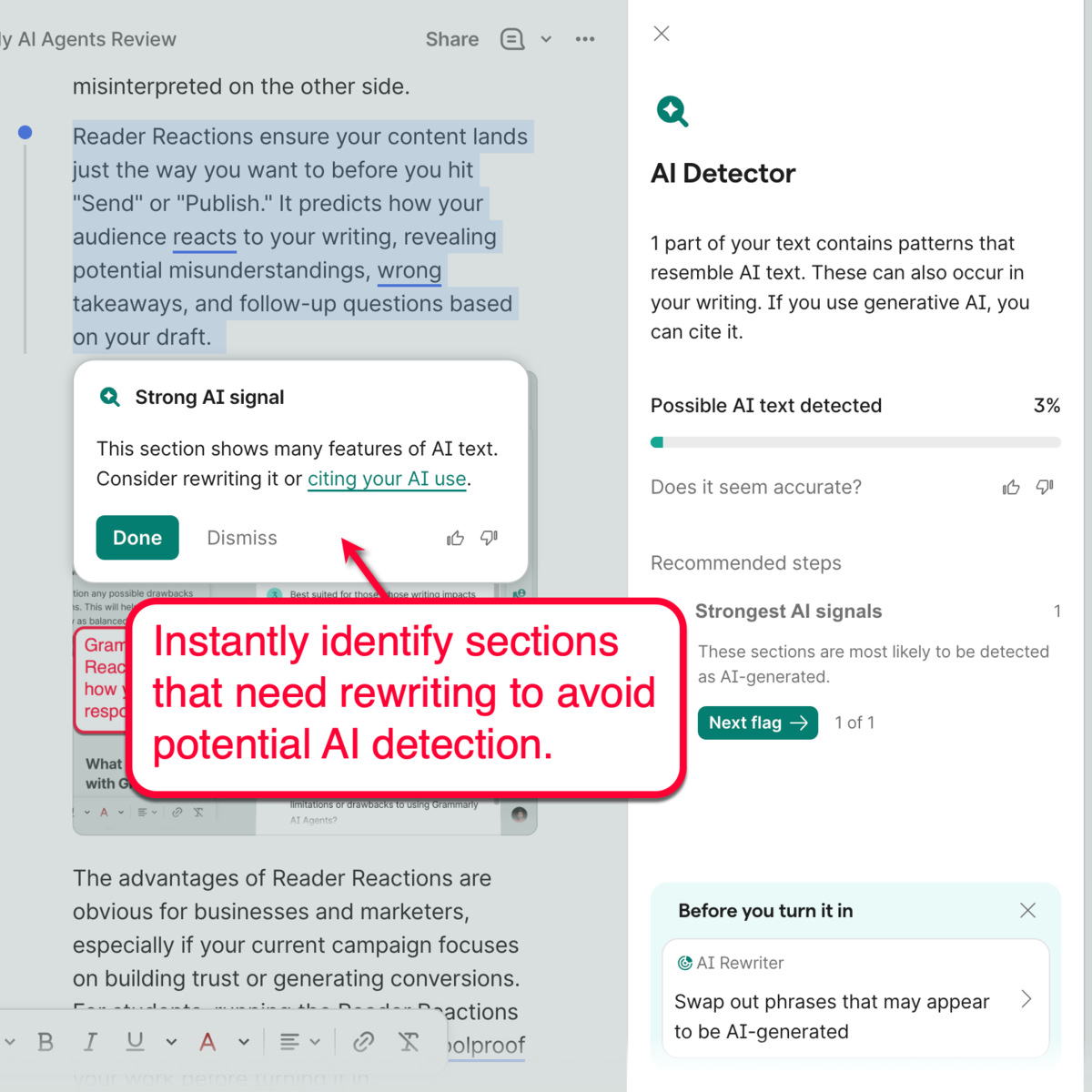
Just take note that the AI Detector tool can also prevent false positives that other detection tools are susceptible to. This ensures you get full credit for the hard work you put in.
7. Plagiarism Checker
It doesn’t matter if the plagiarism is intentional or not — or whether you’re writing for school or work. Plagiarism hits are something you never want in your writing.
Grammarly’s AI Plagiarism Checker will help you spot potential plagiarism hits ahead of time, giving you ample opportunity to make revisions and guarantee the originality of your article.
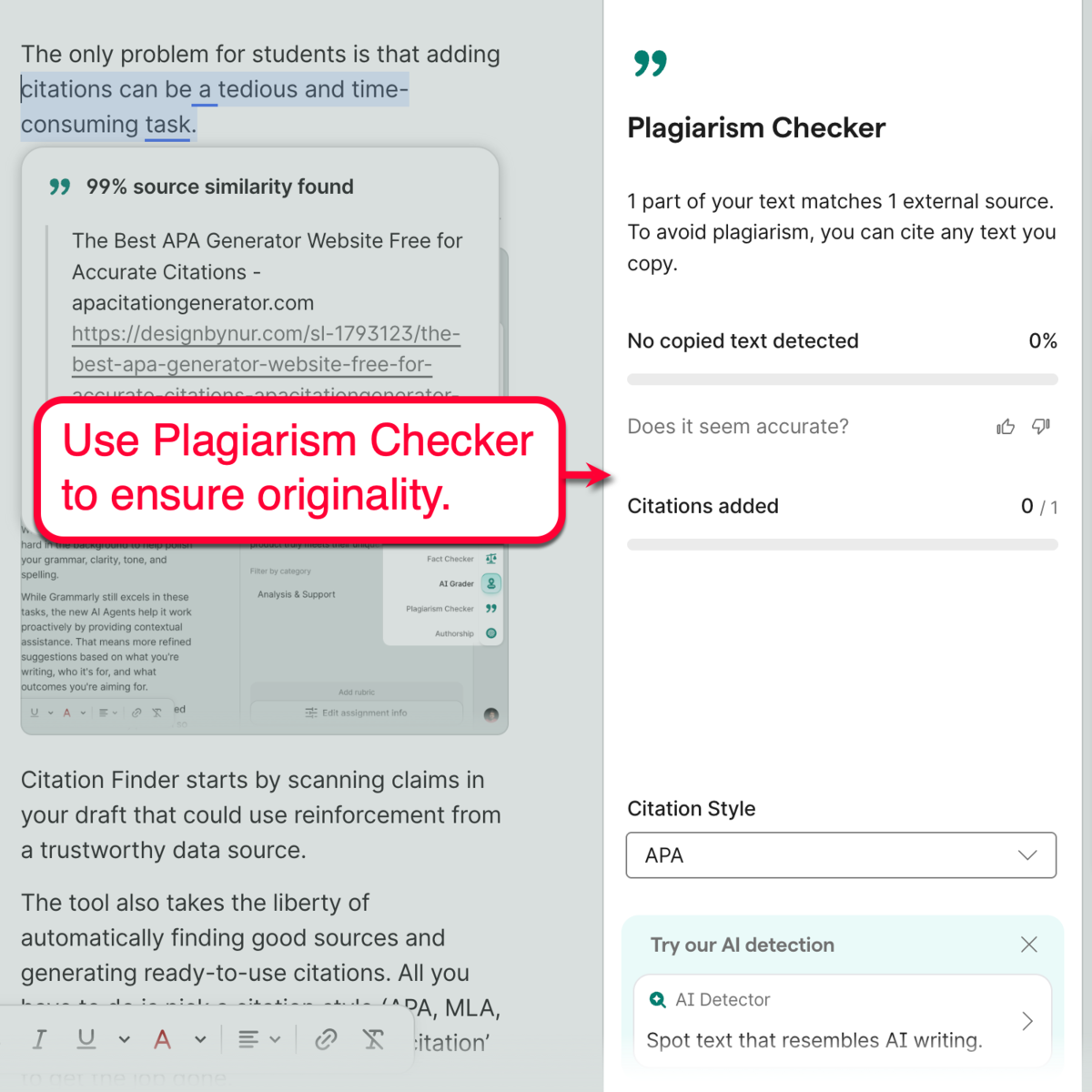
As an alternative to rewriting the sections, Grammarly also gives you the option to insert a citation instead. Either way, Plagiarism Checker allows you to save as much time as possible while ensuring the quality and originality of your work.
Grammarly AI Agents vs ChatGPT
Allow me to clarify one thing: Grammarly AI Agents and ChatGPT are worlds apart.
Don’t be confused by the description “AI writing assistant.”
While ChatGPT is great for generating ideas, outlines, or entire drafts from scratch, Grammarly AI Agents help you get the best out of what you already have.
Here’s the simplest way to explain it:
| ChatGPT | Grammarly AI Agents |
|---|---|
| Great for generating content | Great for perfecting content |
| Requires prompts | Requires your draft, works automatically |
| Separate workspace | Can run inside your apps |
| Needs context and guidelines each time | Learns and remembers your brand guidelines |
Don’t get me wrong, ChatGPT can be a tremendous help for content creation. And, in some cases, there will be some overlaps between ChatGPT and Grammarly AI Agents.
For example, you can ask ChatGPT to proofread an email or rewrite your draft based on your guidelines. But those are tasks best done using a writing-specific tool like Grammarly. At the same time, ChatGPT is more equipped for researching and refining content ideas.
TL;DR, most people can get the best results by combining ChatGPT and Grammarly for different parts of the writing process.
What Makes Grammarly AI Agents Different?
Personally, the biggest advantage of Grammarly AI Agents is one word: convenience.
When using other tools, you have to stop writing, open another tab, configure the feature you need, paste your content, and copy it back to your writing app. Such interruptions may seem small, but they add up to a lot, especially if you work with content on a daily basis.
With Grammarly, you never need to switch to a different workspace.
Whether you’re writing in Google Docs, Gmail, Slack, or any supported app (from Grammarly’s library of over 1 million integrations), Grammarly AI Agents are available where you’re already working.
Finally, remember that the advantage isn’t that AI Agents suddenly made Grammarly smarter than everything else in the AI market. Rather, it made AI assistance feel like a natural part of the writing process rather than a separate task altogether.
Final Verdict: Should You Upgrade?
Whether Grammarly AI Agents are worth it boils down to a few questions, the most important being:
How often does writing impact your work, grades, or income?
If writing is something you do every day, the answer is an easy yes — Grammarly AI Agents are worth upgrading to.
The combination of Reader Reactions, AI Grader, Citation Finder, Humanizer, and Grammarly’s existing editing tools makes the platform the ideal tool for professionals, bloggers, students, and teams.
Exclusive Grammarly Discount
Now is the best time to upgrade to Grammarly Pro.
As a Master Blogging reader, you’re eligible for a 40% discount on Grammarly’s annual subscription plans.
Unlock Grammarly AI Agents: 40% Off Annual Plans, Limited Time.
Disclosure: This article contains affiliate links. We may earn a commission if you purchase through our links at no additional cost to you.

Article by
Ankit Singla is the founder of Master Blogging. With over 15 years of blogging experience, he helps entrepreneurs build blogs that become long-term business assets through content, SEO, and authority.
